 KeltriREADER
Help center
Linked PCB / SCH navigation
Bidirectional cross-probing, hover tracking, and connectivity reconciliation.
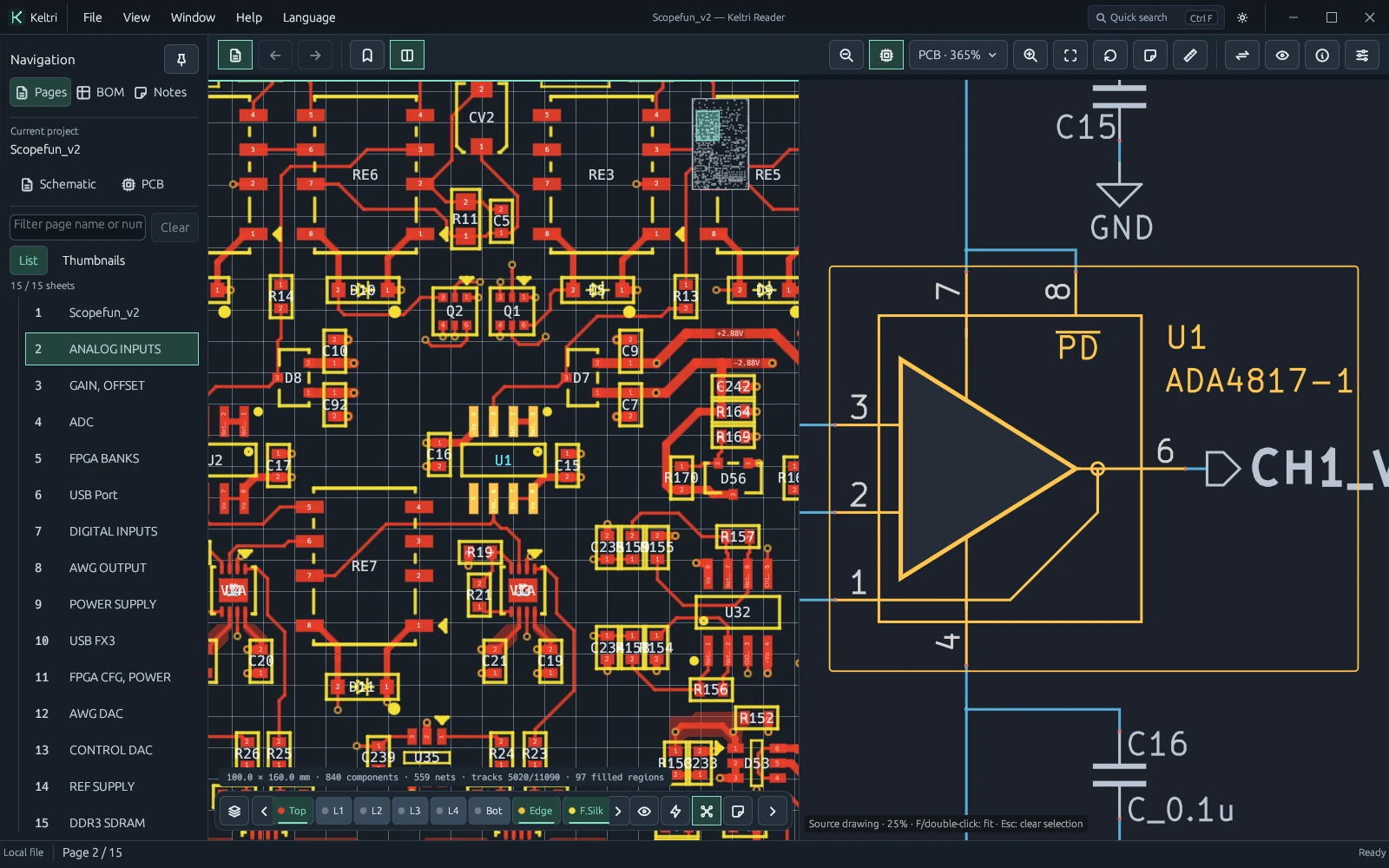
Enable and check linking
With a paired PCB and schematic loaded, click Linked Navigation in the toolbar or press Alt+3 for side-by-side split view.
Clicking any pad on the PCB smoothly glides the schematic viewport to the corresponding symbol pin. Clicking a logic gate on the schematic centers the PCB view on the physical footprint.
Linking is separate from zoom targeting
The toolbar target button cycles between PCB, Schematic, and Both, governing the destination of Ctrl+0 and shared zoom commands independently from cross-probe actions.
Following a cross-probe jump, you can zoom or pan either canvas independently. Reading history (Alt+Left / Right) tracks every jump, letting you step back and forth across inspection paths.
How connections correspond
The matching engine reconciles connectivity via component designators (RefDes), pin identifiers, and terminal sets. Even when a PCB netlist assigns auto-generated net names (such as NetC12_2), pins pair with named schematic labels.
For multi-unit parts (such as hex inverters U1A through U1F) or unannotated pin headers, an interactive candidate popup lets you select the exact gate or pin of interest.
When no counterpart is focused
- Verify project pairing: Confirm that the active PCB and schematic share the same design revision.
- Confirm selection: Alt+click a pad on the PCB to confirm the parent component is selected rather than a stray via.
- Check special terminals: Determine whether the target is a hidden power pin or a non-electrical mounting hole.
- Review properties: If the net is an unassigned floating trace on the counterpart drawing, notice cards summarize status.
- Reconcile revisions: If drawings reflect mismatched revision commits, endpoint discrepancies are surfaced in the inspector.